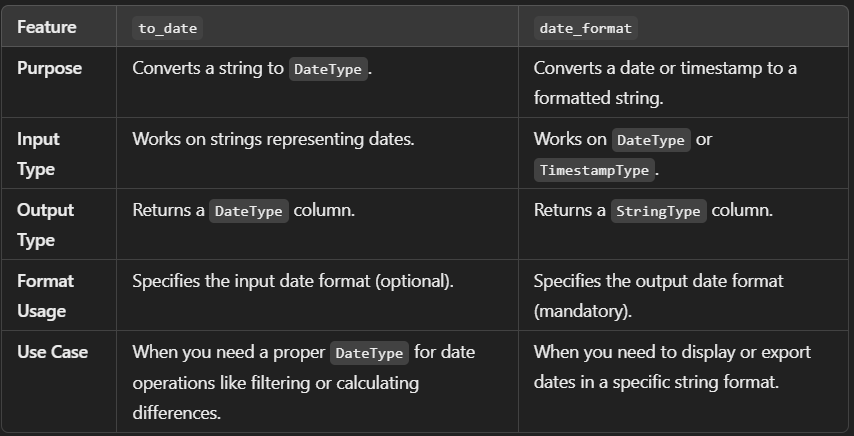
The to_date() function in PySpark is used to convert a string column or expression into a date column. It is particularly useful when you have date values stored as strings in a specific format and want to convert them into a proper date type for processing.
Syntax: -
to_date(column, format=None)
- column: The column or expression containing date strings to convert.
- format: (Optional) The format of the input date strings. If not specified, it uses the default date format of
yyyy-MM-dd.
Example: - Handle Different Date Formats
If your date string is in a different format, you must specify the format explicitly. For instance, for MM/dd/yyyy:
data = [("12/25/2024",), ("01/01/2023",), ("07/15/2023",)]
schema = ["date_string"]

df = spark.createDataFrame(data, schema)

# Convert to date with the specified format
df = df.withColumn("date", to_date("date_string", "MM/dd/yyyy"))
df.show()
+------------+----------+
| date_string|      date|
+------------+----------+
|  12/25/2024|2024-12-25|
|  01/01/2023|2023-01-01|
|  07/15/2023|2023-07-15|
+------------+----------+